



Your website is often the first handshake your business offers to the world, a bustling digital storefront open 24/7, ready to charm and convert.
But here’s the thing: many small and medium-sized enterprises (SMEs) leap into web hosting without a robust plan, making common web hosting mistakes SMEs make that can quietly drag down their search rankings, stall growth, and even cost them customers, money, and precious trust.
The good news?
You can transform your website into a powerful asset! Understanding these frequent web hosting mistakes SMEs make and how to sidestep them is absolutely crucial for turning casual visitors into loyal customers. This guide is your enthusiastic companion, breaking down the top 7 web hosting mistakes SMEs make and equipping you with actionable advice to fix them, ensuring your online presence truly shines!
Mistake 1: Choosing the Wrong Hosting Type or Neglecting Scalability
Starting your online journey is exciting, but picking the right home for your website – your web hosting – is paramount! It’s like choosing the perfect building for your business; you need the right type and enough room to grow.
Understanding Hosting Types
Shared Hosting
This is where most small businesses begin.
Think of it as a busy “hostel” for your website, with many sites sharing one server and hard drive. It’s typically the most affordable option.
Virtual Private Server (VPS) Hosting
A fantastic step up! This is like moving into an “apartment building”.
You still share a server, but your data is partitioned, giving you dedicated resources so neighbouring websites can’t hog all the bandwidth and slow you down. It’s often the natural next step after shared hosting.
Cloud Hosting
This option stores and serves your data across multiple servers, offering incredible flexibility and control.
It’s like travelling from “hotel to hotel,” paying only for the resources you use.
However, full cloud hosting often comes with higher technical requirements than shared or VPS hosting. Some hosts offer ‘shared cloud hosting,’ which is essentially shared hosting on cloud servers.
Dedicated Server Hosting
This is your own “house”!
You are the sole tenant on the server, gaining maximum control and security. But beware, it demands more technical expertise from you.
Managed vs. Unmanaged Hosting
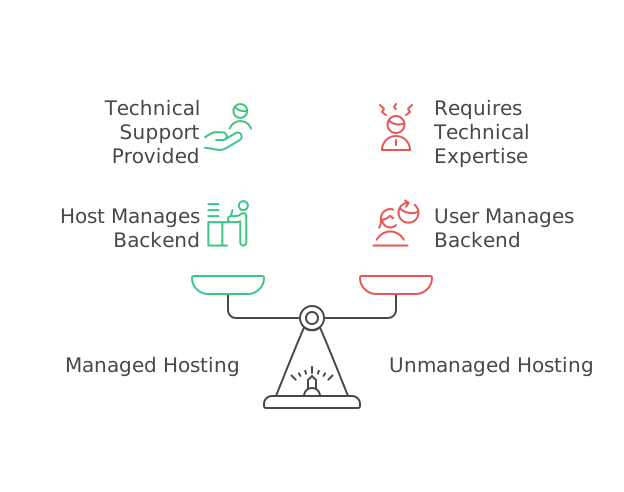
Managed Hosting
For SMEs, this is a lifesaver!
The host takes care of essential backend tasks like software updates, security monitoring, and server management. Providers like Kinsta are lauded for their highly skilled technical support, and TMDHosting offers excellent managed hosting services.
Unmanaged Hosting
This puts the onus entirely on you for server setup and management, which “could be problematic” if you lack technical expertise.
Scalability for Growth
Your business is poised for growth, and your hosting needs to keep pace! As your website demands increase, you’ll need “upgraded plans that offer more storage, better performance, and greater customisability”. Look for hosts that offer a mix of hosting types to allow for seamless upgrades. Hosts such as IONOS, DreamHost, and Hostwinds provide strong options for growing companies.

Suggested reading:
Managed Cloud Hosting Trends in 2025: Insights, Tips, and Why it’s More Critical Than Ever
Mistake 2: Ignoring Website Performance and Speed
Imagine walking into a physical shop only for the door to take ages to open.
Frustrating, right?
It’s the same online! Slow-loading pages are a monumental mistake.

Why Speed Matters
Direct Ranking Factor
Google takes speed seriously!
It uses Core Web Vitals – Largest Contentful Paint (LCP), Interaction to Next Paint (INP), and Cumulative Layout Shift (CLS) – as direct ranking factors for both desktop and mobile searches. You should aim for an LCP under 2.5 seconds, INP below 200 milliseconds, and CLS less than 0.1 for optimal performance.
User Experience & Conversions
A mere one-second delay can drastically hurt conversion rates. Over 50% of users will abandon a website that loads slowly, especially on mobile devices. This directly impacts your bounce rate – the percentage of visitors who leave after viewing just one page.
How to Fix It
| Optimise Images | Large images are a common culprit for slow sites. Compress them using formats like WebP or JPEG. |
| Use Quality Hosting | “Cheap hosting can slow your website down”. Look for hosts offering NVMe SSD storage for superior performance. SiteGround, for instance, is noted for its excellent performance. |
| Enable Caching | This brilliant trick stores parts of your website in a visitor’s browser, leading to faster repeat visits. Many quality hosts include built-in caching. |
| Minimise Plugins/Code | Too many plugins, particularly on WordPress, can be a drag. Remove unnecessary ones and minimise CSS and JavaScript files. |
| Content Delivery Network (CDN) | Utilising a CDN helps serve your content faster to global visitors. Some hosts, like Namecheap and SiteGround, include it. |
| Geographical Server Location | For local businesses, choose hosts with servers close to your physical location or primary customer base. DreamHost has limited global data centers, which can impact performance in other regions. |
| Tool for Testing Speed | Get actionable improvement suggestions by testing your site’s speed with Google PageSpeed Insights. |
Mistake 3: Overlooking Robust Security and Backup Solutions
Your website holds invaluable business data and customer trust. Leaving it vulnerable is like leaving your physical shop unlocked! Security and backups are non-negotiable.
Essential Security Features
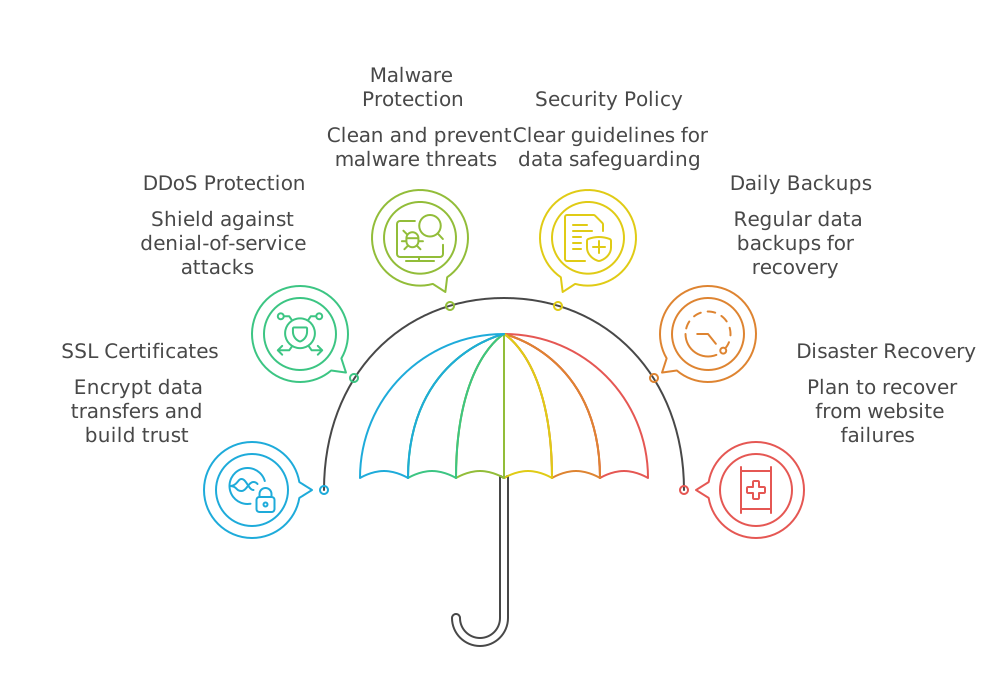
SSL Certificates
Absolutely vital for encrypting data transfers (HTTPS). Without it, Google displays a “Not Secure” warning, which can understandably deter visitors and erode trust. Most reputable hosts include SSLs.
DDoS Protection
Helps shield your site from crippling distributed denial-of-service attacks.
Malware Protection/Removal
Look for hosts that offer malware cleanups and robust firewalls. GreenGeeks, for example, includes free malware cleanups, which is a fantastic perk, especially for SMBs without dedicated tech teams. ScalaHosting boasts an AI security system that blocks 99.97% of attacks.
Active Security Policy
Choose a platform with a clear and transparent security policy detailing data safeguarding.
Backup Management is Non-Negotiable
Daily/Automatic Backups
Prioritise hosts that offer daily backups. Mochahost includes automatic off-site backups, adding “another layer of security and disaster recovery”. DreamHost also offers daily backups on most WordPress and Shared plans.
Disaster Recovery
Backups are your safety net! “Ransomware, natural disasters or even an intern tripping over a power cord can tank your website,” so backups are vital to “recover quickly”.
Is Your Business Ready for Seamless, Scalable Cloud Web Hosting?
Empower your online presence with robust cloud hosting that ensures speed, security, and effortless scalability. From lightning-fast load times to built-in redundancy and 24/7 support, keep your website performing at its peak—no matter how fast you grow.
Mistake 4: Neglecting Customer Support Quality and Availability
Even with the smoothest sailing, unexpected issues can pop up: a billing error, a control panel glitch, or a server hiccup. Quick and effective customer support isn’t just nice to have; it’s vital for preventing costly downtime and lost sales.
What to Look For
Responsiveness and Expertise
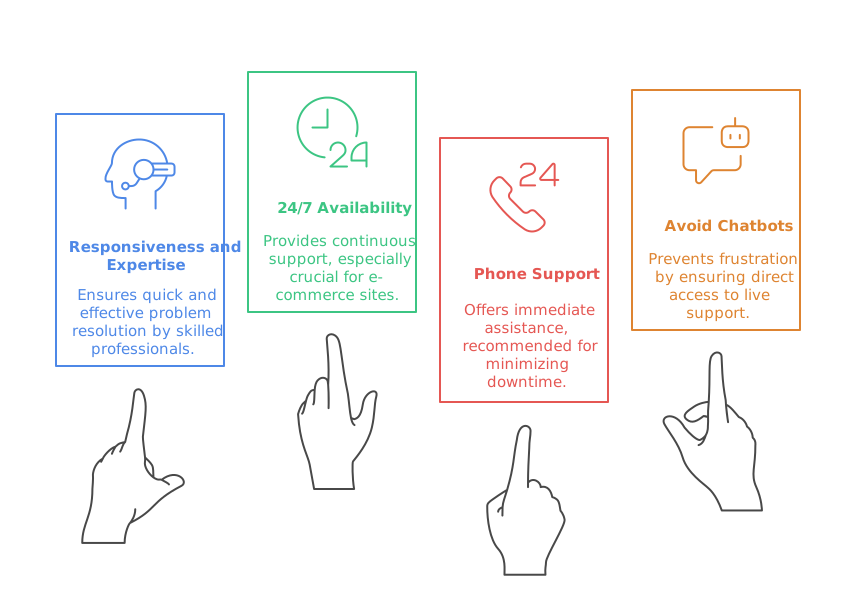
You want real people who are skilled technical experts, not just entry-level staff. Kinsta “prides itself on support from real people“. TMDHosting impressively pledges a 15-minute customer support response time. Hostinger is also known for quick response times.
Availability
Seek out 24/7 support options, with live chat being a particularly convenient channel.
Phone Support
For e-commerce sites where downtime hits hard, 24/7 phone support is highly recommended. GreenGeeks and Mochahost offer phone support, though wait times can sometimes be lengthy. Namecheap, however, does not offer phone support at all. IONOS offers 24/7 phone support, though it’s not toll-free.
Beware of Chatbots
Some AI chatbots can be “completely worthless”, making it frustrating to reach a live person. Hostinger’s triage chatbot is a rare exception, noted for being clear, concise, and helpful.
Mistake 5: Falling for Hidden Costs and Tricky Contracts
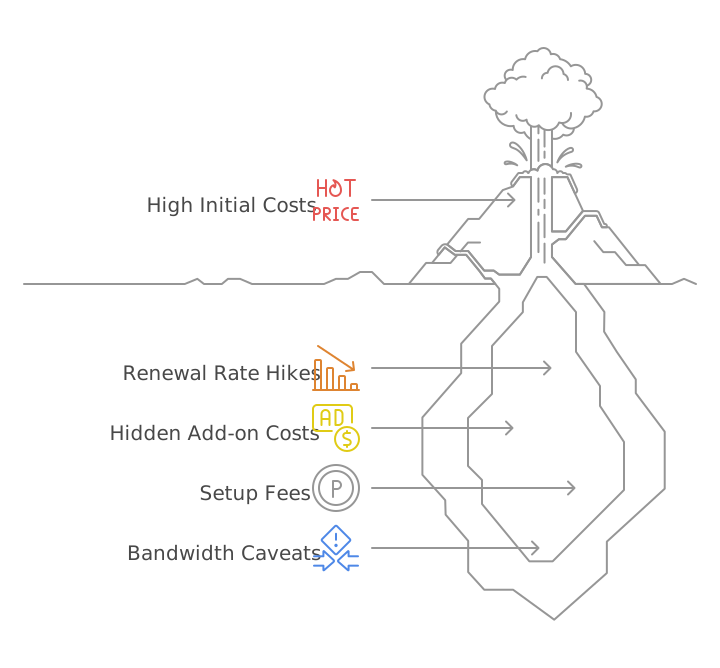
Web hosting costs can feel like a labyrinth, varying wildly based on features, server optimisation, resources, and service level. Many SMEs get caught out by pricing structures that seem too good to be true.
Understanding Pricing Structures
Introductory Offers vs. Renewal Rates
This is a big one!
Many hosts lure you in with deep discounts for new customers, but “prices often go up a lot after the first year” or after the initial contract. Renewal prices can jump by as much as four times the initial rate with some providers like SiteGround.
Tip: When evaluating costs, focus on the “overall value” of features and service rather than just the cheapest initial price. Multi-year upfront payments can often secure better long-term value.
Hidden Add-on Costs
Be vigilant for “lots of potential add-on costs”. Lower-tier plans might charge extra for services that other hosts include as standard. For example, DreamHost can charge $99 or more for site migrations and $199 to fix a hacked site.
Setup Fees
Some hosts, like GreenGeeks and Hostinger, charge non-refundable setup fees for monthly billing.
"Unmetered" Bandwidth Caveats
Be cautious when you see “unmetered” features; it’s often shorthand for ‘we’ll let you know if we think you are using too much‘ rather than a truly unlimited allowance.

Mistake 6: Neglecting Website Portability and Scalability
Your website is a dynamic entity, just like your business!
You need the freedom to move it if circumstances change and the ability to expand your hosting as you grow.
Website Portability
Your Files Are Yours
It’s crucial that your website files are truly yours and can be migrated to a new host if ever needed.
CMS vs. Website Builders
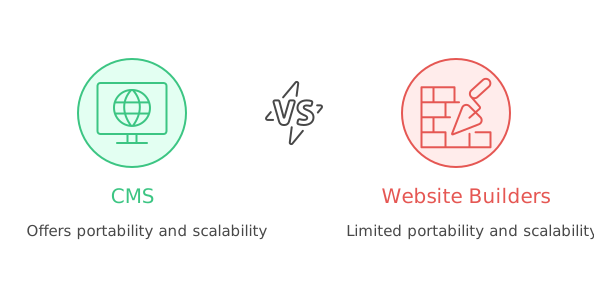
Websites built with content management systems (CMS) like WordPress or Joomla are generally portable if you have access to their files. However, be warned: websites created with host-specific website builders often cannot be migrated because they don’t grant access to the design files.
Migration Services
Many excellent hosts offer migration assistance, ranging from automated tools to “white glove” services where their team handles the move for you. Namecheap, for instance, offers a guaranteed cPanel migration within 24 hours with minimal downtime. Mochahost also includes migration services.
Scalability Beyond Initial Needs
- Your hosting service must be flexible enough to “keep up, with upgraded plans that offer more storage, better performance, and greater customisability” as your business expands.
- Look for hosts that offer a diverse range of plans—shared, virtual, dedicated, and cloud hosting—at various price points to allow for seamless upgrades. IONOS, DreamHost, and Hostwinds are noted for providing robust options for growing companies.
Is Your Business Ensuring Peak Website Performance and Security?
Stay ahead of the curve with comprehensive website maintenance and support services that keep your site updated, secure, and running smoothly. From routine updates and performance optimisation to proactive troubleshooting, we ensure your website works as hard as you do.
Mistake 7: Ignoring Ongoing Maintenance and Content Updates
Congratulations, you have a website!
Now, here’s a crucial truth: a website is never truly “finished”.
Technology evolves at lightning speed, and an unmaintained site will inevitably fall behind or even break.
Impact on Credibility and SEO
Credibility and Trust
An outdated website or neglected content “can hurt credibility, mislead visitors, damage trust,” and give the impression that your business is “inactive or unreliable”.
SEO Rankings
Google loves fresh, relevant content! It “prioritises sites with regularly updated content”. Thin or generic content will lower your SEO rankings and cause visitors to leave quickly.
Google’s Helpful Content System and E-E-A-T (Experience, Expertise, Authoritativeness, Trustworthiness) framework actively evaluate whether your content provides original value and is genuinely helpful.
Practical Steps for Maintenance
Regular Content Refresh
Keep your website vibrant!
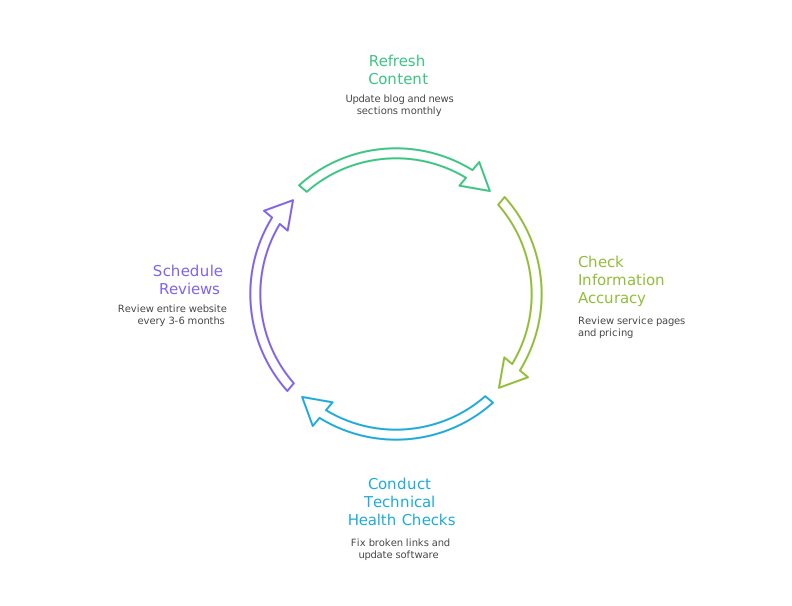
Update your blog and news section at least monthly.
Refresh your homepage content every few months to keep it current.
Check Information Accuracy
This is vital for trust!
Regularly review your service pages, pricing, images, and testimonials to ensure everything is up-to-date and accurate.
Technical Health Checks
Periodically check for broken links and update your website software regularly. Don’t forget to test crucial elements like contact forms and embedded maps.
Schedule Reviews
Set a recurring reminder to review your entire website every 3-6 months to ensure it remains current and effective.
Transforming Your Website from Liability to Asset
Avoiding these common web hosting mistakes SMEs make—from meticulously choosing the right hosting solution and ensuring top-notch security to providing brilliant customer support and committing to ongoing maintenance—can make an enormous difference in how potential customers perceive and engage with your business.
The payoff is truly exciting!
A well-optimised website is not just a digital brochure; it’s a dynamic, high-performing asset that’s fast, mobile-friendly, locally optimised, and brimming with helpful, engaging content. This powerhouse combination will naturally attract more leads without the endless drain of constant ad spending.
So, what are you waiting for?
Review your current hosting setup and conduct a thorough website health check. Don’t let these common web hosting mistakes SMEs make hold your fantastic business back. Embrace the power of a perfectly hosted and maintained website, and watch your business thrive online!
Maximise your ROI and streamline operations with a cost-effective, scalable cloud hosting solution tailored for modern businesses. Let’s explore how managed cloud hosting can drive growth and stability for your digital success.