




Building a successful online presence starts with one crucial decision: finding the best web hosting service for business website. Your host isn’t just where your files live—it’s the foundation of speed, security, scalability, and ultimately, your visitors’ experience. With so many providers promising the moon, how do you cut through the noise and zero in on the perfect fit for your enterprise?
What Is Web Hosting—and Why It Matters
At its core, web hosting is renting space on powerful servers to store your site’s files—HTML, images, videos, scripts, and more—so they can be delivered to browsers worldwide. Your domain name (e.g., yourbusiness.com) points to that server, letting visitors find and interact with your site.
Hosting ≠ Domain.
You need both: one for your address, one for your space.
Why not self-host?
Running your own server demands advanced expertise, expensive hardware, constant maintenance, and environmental controls. For most businesses, professional hosting delivers reliability, security, and round-the-clock management at a fraction of the cost.
Professional hosts handle software updates, security patches, backups, and troubleshooting. They leverage economies of scale to offer affordable plans—often bundling free SSL certificates, email accounts, and easy control panels.
The result?
Your site stays online, fast, and secure, letting you focus on growth.
Defining Your Requirements: The Starting Point
Before comparing plans, pause and outline your site’s unique needs. There’s no one-size-fits-all solution, and understanding these factors will guide you toward the best web hosting service for business website.
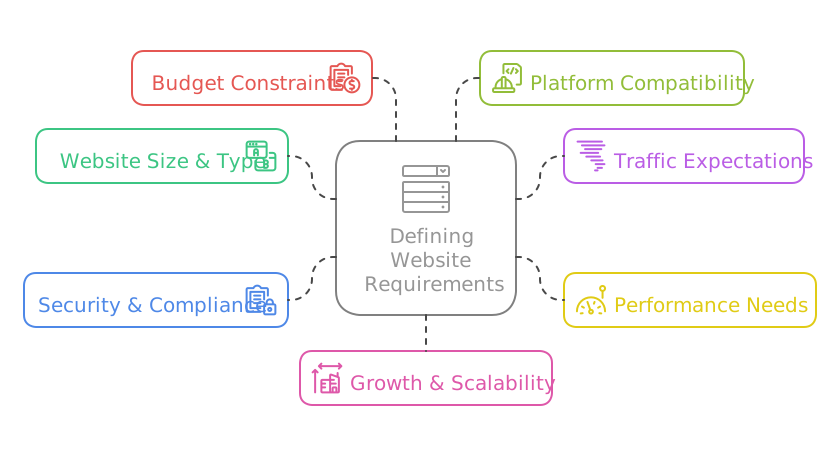
Website Size & Type
- Personal portfolio vs. media-rich e-commerce store
- Number of pages, images, videos, downloads
Traffic Expectations
- Hundreds of monthly visitors vs. thousands per day
- Seasonal spikes, marketing campaigns, product launches
Performance Needs
- Fast image/video delivery, interactive features
- Impact on bounce rate and SEO
Security & Compliance
Budget Constraints
- Introductory offers vs. renewal pricing
- Transparent fees, money-back guarantees
Platform Compatibility
Growth & Scalability
- Ability to upgrade CPU, RAM, storage, and bandwidth
- Flexible migrations from shared to VPS, cloud, or dedicated
By documenting these, you equip yourself to eliminate hosts that can’t meet must-have criteria, narrowing the field to contenders that align with both current demands and future ambitions.

Suggested reading:
Managed Cloud Hosting Trends in 2025: Insights, Tips, and Why it’s More Critical Than Ever
The Hosting Landscape: Types Explained
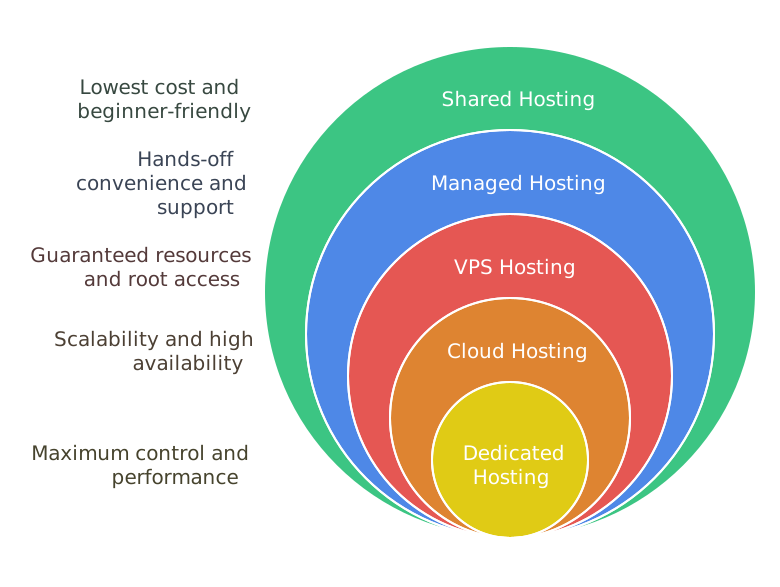
Shared Hosting
Ideal for: Small sites, blogs, portfolios
- How it works: Multiple sites share one server’s resources.
- Pros: Lowest cost, beginner-friendly setup, managed infrastructure.
- Cons: Performance depends on neighbours; traffic surges elsewhere can slow or crash your site.
Virtual Private Server (VPS)
Ideal for: Growing businesses, mid-level e-commerce
- How it works: A physical server is partitioned into isolated virtual servers.
- Pros: Guaranteed resource allotments, root access, easy vertical scaling.
- Cons: Higher cost than shared; requires some server management knowledge.
Cloud Hosting
Ideal for: Sites with variable traffic, SaaS, rapidly scaling businesses
- How it works: Resources are pooled across multiple servers (“the cloud”).
- Pros: Auto-scaling, high availability (failover protection), pay-as-you-go pricing.
- Cons: Costs can fluctuate; management may be more complex.
Dedicated Hosting
Ideal for: High-traffic portals, gaming, streaming, sensitive data handling
- How it works: You lease an entire physical server.
- Pros: Maximum performance, full control over hardware/software, strong isolation.
- Cons: Highest price tag; demands in-house or outsourced sysadmin expertise.
Managed Hosting
Ideal for: Companies without dedicated IT teams
- How it works: Hosting provider handles updates, security, server monitoring, backups.
- Pros: Hands-off convenience, expert support, optimized environment.
- Cons: Premium pricing; less direct control over server settings.
WordPress-Optimized Hosting
Ideal for: Blogs, content sites, WooCommerce stores on WordPress
- How it works: Servers configured specifically for WordPress performance and security.
- Pros: Auto-updates for core/plugins/themes, built-in caching, expert WP support.
- Cons: Limited to WordPress; more expensive than generic shared plans.
Is Your Business Ready for Seamless, Scalable Cloud Web Hosting?
Empower your online presence with robust cloud hosting that ensures speed, security, and effortless scalability. From lightning-fast load times to built-in redundancy and 24/7 support, keep your website performing at its peak—no matter how fast you grow.
Essential Selection Criteria
When vetting hosts, scrutinise these attributes to ensure you land the best web hosting service for business website:
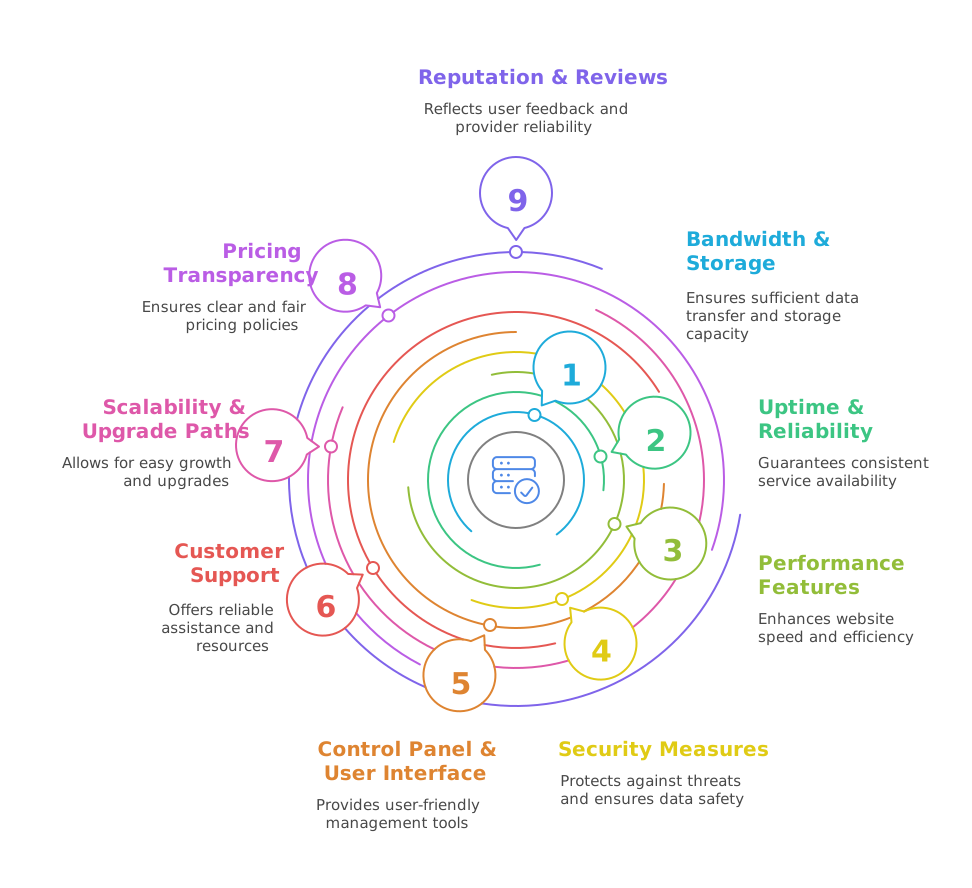
Bandwidth & Storage
- Storage: SSDs (or NVMe SSDs) dramatically speed up file access—opt for these over HDDs.
- Bandwidth: Sufficient monthly transfer limits or “unlimited” with transparent fair-use policies.
- Rule of thumb: Pick plans offering at least 20% more capacity than your forecasted needs.
Uptime & Reliability
- Minimum guarantee: 99.9% uptime (ideal: 99.99% or 100% network SLA).
- Redundancy: Multiple power sources, network routes, and backup systems.
- Penalties: Some hosts credit your account if uptime falls below the guaranteed threshold.
Performance Features
- Caching: Server-level caching (e.g., Varnish) accelerates repeat visitor loads.
- CDN integration: Distributes content globally, reducing latency for distant users.
- Server location: Data centers near your primary audience improve load times.
Security Measures
- SSL certificates: Free Let’s Encrypt or paid DV/OV/EV certificates.
- Firewalls & DDoS protection: Mitigate malicious traffic.
- Malware scanning/removal: Automated detection and cleanup.
- Backups: Daily or real-time backups stored off-site for rapid recovery.
- Compliance: GDPR, PCI DSS, HIPAA certifications as needed.
- 2FA: Adds a critical layer to administrative logins.
Control Panel & User Interface
- Industry standard: cPanel, Plesk, or intuitive proprietary dashboards.
- Features: One-click script installers, file managers, database tools, staging environments.
Customer Support
- Availability: 24/7 support via live chat, phone, and ticketing.
- Knowledge base: Extensive tutorials, FAQs, and community forums.
- Response times: Look for consistent under-five-minute live-chat wait times.
Scalability & Upgrade Paths
- Easy plan upgrades: From shared to VPS/cloud with minimal downtime.
- Modular add-ons: Increase RAM, CPU, storage on demand.
- Data portability: Clear migration policies and free migration assistance.
Pricing Transparency
- Intro vs. renewal rates: Note how much your plan will cost after the promotional period.
- Contract lengths: Multi-year discounts vs. month-to-month flexibility.
- Refund policies: Money-back guarantees (30-, 60-, or even 97-day trials).
Reputation & Reviews
- Third-party sites: Trustpilot, G2, HostAdvice, Reddit.
- Common themes: Praise for uptime, speed, and support; watch for recurring complaints.
- Provider responses: How they handle negative feedback can signal reliability.

When to Upgrade: Key Signals
Your site’s needs will evolve.
Recognise these red flags that it’s time to move up:
Slow Load Times & High Latency
Shared resources can’t keep pace with growing user demand, harming SEO and conversions.
Bandwidth or Storage Exhaustion
“Bandwidth exceeded” or constant pleas to delete files indicate you’ve outgrown your plan.
Security Concerns
As you collect more sensitive data, shared environments become riskier. A VPS or dedicated environment offers stronger isolation.
Launching E-commerce or High-Volume Campaigns
Processing payments and featuring large catalogues demand robust, PCI-compliant infrastructure.
Frequent Outages
Even brief downtime impacts credibility and revenue—high-availability solutions become essential.
Upgrading proactively ensures performance remains stellar, security stays tight, and your customer experience never falters.
Is Your Business Ensuring Peak Website Performance and Security?
Stay ahead of the curve with comprehensive website maintenance and support services that keep your site updated, secure, and running smoothly. From routine updates and performance optimisation to proactive troubleshooting, we ensure your website works as hard as you do.
Final Checklist: Your Roadmap to the Best Web Hosting Service for Business Website
Before choosing, verify your top contenders, check every box:
- Storage & Bandwidth
SSD/NVMe drives, generous or limitless fair-use caps. - SSL Certificate
Free or affordable, auto-renewal enabled. - Uptime Guarantee
≥ 99.9% SLA with compensation clauses. - Control Panel
Intuitive cPanel/Plesk or streamlined custom UI. - Scalability
Easy resource upgrades, clear migration paths. - Support
24/7 multi-channel help, fast response, rich documentation. - Pricing
Transparent renewal rates, money-back trial period. - Security
Firewalls, DDoS mitigation, malware scanning, automated backups, 2FA. - Data Centers
Locations close to your audience. - Reputation
Positive third-party reviews and responsive provider behaviour.
Choosing the best web hosting service for business website is more than a checkbox on your launch list—it’s a strategic investment in reliability, speed, security, and customer satisfaction. By understanding your site’s unique demands, evaluating the major hosting types, and dissecting providers based on the criteria above, you’ll confidently select a host that not only meets today’s needs but also fuels tomorrow’s growth.
Your digital storefront deserves a rock-solid foundation. Compare plans, read the fine print, test support channels, and leverage trial periods. With the right host in your corner, your business website will perform at its peak, delighting visitors and driving results.
Maximise your ROI and streamline operations with a cost-effective, scalable cloud hosting solution tailored for modern businesses. Let’s explore how managed cloud hosting can drive growth and stability for your digital success.